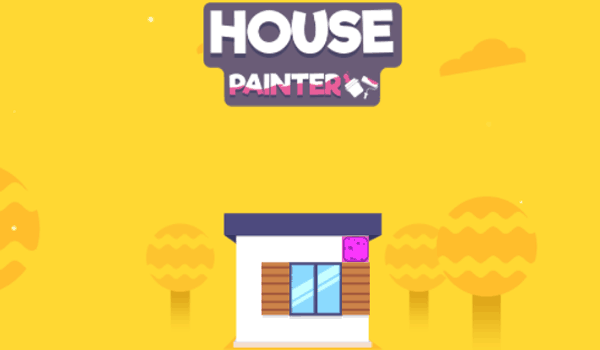
Neighborhood Hue Designer
Reviews
Neighborhood Hue Designer offers a genuinely relaxing experience. The core loop of selecting a house, choosing colors, and seeing it placed in the growing city is satisfying without being stressful. The gradual unlock system adds variety, and the absence of timers makes it a great choice for mindful play. It is simple enough for young children yet engaging for adults seeking a low-pressure creative outlet.
About This Game
Core Painting Mechanics
In Neighborhood Hue Designer, the primary activity involves selecting a structure from a lineup of available buildings. Each house presents distinct sections, such as walls, roofing, and trim, allowing for detailed color application. The palette offers a broad spectrum of shades, from soft pastels to bold primary colors. Players can experiment freely, applying different hues to each part of the house without any penalties. The process is straightforward: choose a color, tap or click on the area you wish to paint, and watch the transformation occur instantly. This direct interaction makes the experience accessible to newcomers while providing enough variety for those who enjoy meticulous design work.
Community Growth & Visual Feedback
As each house is completed, it is placed into a growing cityscape that serves as a visual record of your progress. The neighborhood expands outward, filling empty lots with colorful residences. This gradual buildup provides a clear sense of achievement, as the once-monochrome blocks become a lively, diverse area. The game does not use points or timers; instead, the expanding city itself becomes the reward. Seeing a row of newly painted homes creates a satisfying visual narrative of your creative journey. This design encourages players to continue painting not for competition, but for the pleasure of building a beautiful community.
Unlock System & Creative Variety
Progress in Neighborhood Hue Designer is tied to the number of houses you complete. As you finish more buildings, new house models and color options become available. These additions keep the activity fresh, introducing different architectural styles and more nuanced color palettes. For example, early on you might work with basic cottages and primary colors, while later stages offer Victorian-style homes with intricate details and a wider range of muted or metallic tones. This gradual introduction of content ensures that the creative possibilities expand alongside your growing city, preventing the experience from becoming repetitive.
Relaxed Pace & Accessibility
The game deliberately avoids pressure. There are no countdowns, high scores, or failure states. Players can take breaks between houses or spend hours perfecting a single design. The controls are simple, requiring only a mouse or touch input, making it suitable for young children, older adults, and anyone seeking a low-stress digital activity. The gentle pace allows for mindful engagement, where the focus is on the act of creation rather than on achieving a specific outcome. This makes Neighborhood Hue Designer a fitting choice for unwinding after a busy day or for a quiet, focused hobby.
✅ Compatibility & Testing
System Requirements



Comments
0 comments