What Is: Object Discovery Puzzle
Reviews
What Is is a safe and effective educational puzzle game for young children. It uses picture matching to build observation and vocabulary without requiring reading skills. The touch controls are easy for small hands, and the game works on phones, tablets, and computers. Parents appreciate the age-appropriate content and clear feedback. It is a great choice for family-friendly learning.
About This Game
Game Introduction
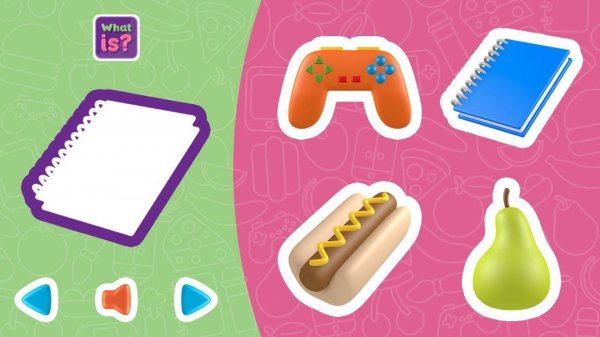
What Is is a puzzle game created for children and families. The main goal is to look at a picture on the screen and then select the correct object from a list of options. This activity helps children improve their observation skills and learn new words in a fun and relaxed way. The game was designed by Nau.kids to provide a safe and age-appropriate experience for young learners. Because the game uses images instead of text, even children who cannot read yet can play on their own. What Is works on phones, tablets, and computers, so kids can enjoy it at home or on the go. The simple design and clear feedback make it easy for anyone to start playing right away.
How to Play
Playing What Is is very simple. A picture appears on the screen, and the player must tap or click on the object that matches the picture. There are no written instructions or complicated rules. After making a choice, the game immediately shows whether the answer is correct. Each round presents a new image, so the game stays interesting and encourages repeated play. The controls are designed for small fingers on touchscreens and also work well with a mouse on a computer.
Game Features
Key features of What Is include fun object discovery that turns learning into a game. The touch controls are easy for young children to use. The entire experience is safe for all ages with no inappropriate content. No reading is required, so pre-readers can play independently. The game is compatible with phones, tablets, and computers, ensuring accessibility across devices. Each round offers a new challenge, promoting continuous engagement and learning through play.
Tips for Success
To get the most out of What Is, encourage your child to take their time looking at each image before answering. This helps build careful observation habits. Celebrate correct answers to boost confidence, and treat wrong answers as learning opportunities—simply try the next round. Playing regularly can help reinforce vocabulary and object recognition. Since the game is self-paced, let children play at their own speed without pressure.
Compatibility
System Requirements