WordSoccer Online Word Game
Reviews
WordSoccer offers a fresh twist on word puzzles by adding a competitive soccer theme. The multiplayer matches are quick and engaging, making it perfect for short breaks. The support for multiple languages and the ability to play with friends add to its appeal. It's easy to learn but challenging to master, especially under time pressure.
About This Game
Game Introduction
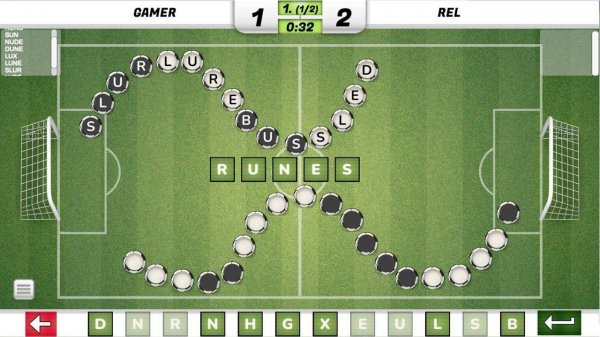
WordSoccer is an online multiplayer word puzzle game that blends the excitement of word creation with a soccer-inspired scoring system. Players compete to form words from a set of available letters, with each valid word counting as a goal. The player who scores the most goals wins the match. This unique combination of sports and puzzles offers a fun way to build vocabulary and quick thinking, making each match a competitive and engaging experience. The game is designed for quick sessions and social competition, offering a clean and engaging experience for word game fans.
How to Play
In WordSoccer, players take turns creating words from a pool of letters displayed on the screen. To play, you select letters to form a word and then submit it to score a goal. A timer keeps the action moving, requiring fast thinking and effective vocabulary use. The interface is intuitive with clear instructions. You can play against random opponents online or invite a friend for a private match. The player with the most goals at the end wins. The game is simple to learn but challenging to master.
Game Features
Key features of WordSoccer include multiplayer word soccer gameplay, support for English and Czech languages, online play with friends, vocabulary building opportunities, and fast-paced fun. The game is designed for quick sessions and social competition, offering a clean and engaging experience for word game fans. It combines familiar puzzle mechanics with a competitive edge, making each match feel fresh. The simple rules and social features make it easy to pick up and play with others.
Tips for Success
To succeed in WordSoccer, practice forming words quickly under time pressure. Expand your vocabulary by learning common short words and prefixes. Pay attention to the letters available and try to spot longer words for higher scores. Stay calm and think ahead, as the timer adds urgency. Playing regularly will improve your speed and word recognition. Also, consider playing against friends to develop strategies and learn from their word choices.
Compatibility
System Requirements